Your Menu Is Your Best Salesperson
Most restaurant owners treat their menu as a list of items with prices. That's like hiring a salesperson and telling them to just stand quietly in the corner.
Your menu is the one thing every single customer interacts with. Not your decor, not your signage, not your Instagram. The menu. And yet most menus are thrown together based on what the kitchen can make, with prices based on gut feel, in an order that hasn't changed in years.
Menu optimization isn't about making your menu "prettier." It's about structuring, pricing, and presenting your items in a way that guides customers toward higher-value orders — without them feeling pushed.
The restaurants that get this right see 20-40% increases in average order value. Here's how they do it.
Menu Psychology: How Customers Actually Read Menus
Decades of eye-tracking research reveals how customers scan menus. Understanding these patterns lets you place your most profitable items where eyes naturally go.
The Golden Triangle
On a single-page or digital menu, customers' eyes move in a predictable pattern: center first, then top-right, then top-left. This is the "golden triangle." Your highest-margin items should live in these zones.
On a two-page printed menu, the pattern is different — the right page gets more attention than the left. But on a phone screen (where digital menus live), it's a straight vertical scroll, which means your first 3-4 items in each category get the most attention.
Action step: Put your highest-margin items first in each category, not buried at the bottom.
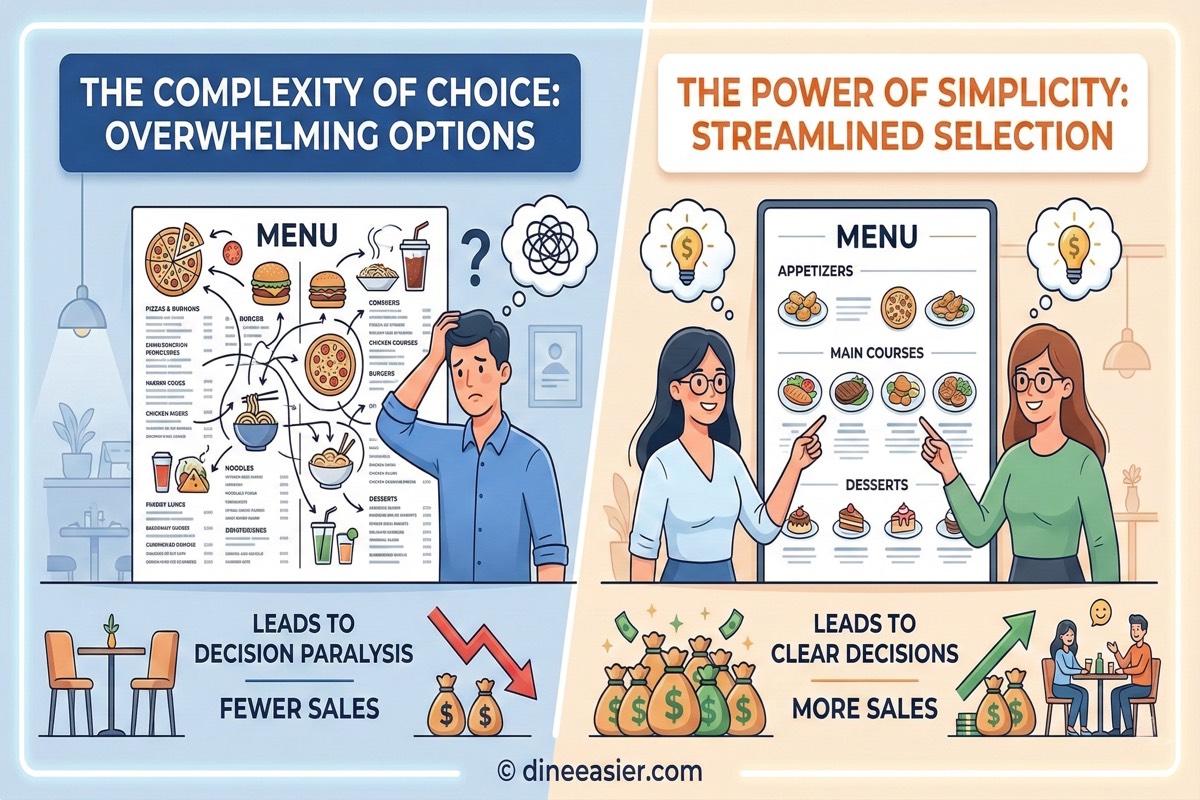
The Paradox of Choice
Research from Columbia University showed that when people are presented with 24 options, only 3% make a purchase. When shown 6 options, 30% buy.
The same applies to menus. Too many items per category overwhelms customers. They default to familiar, safe choices (usually your lowest-margin items).
The sweet spot: 5-7 items per category. If you have more, split into subcategories. A "Starters" section with 18 items is overwhelming. "Soups," "Salads," and "Small Plates" with 6 each is manageable.
Action step: Audit every category. If any has more than 8 items, split or trim.
Anchoring Effect
When customers see a ₹1,200 dish first, the ₹600 dish next to it feels like a deal. This is anchoring — the first price seen becomes the reference point for everything after.
Place one premium item at the top of each category. You don't need it to sell well. It just needs to make everything else look reasonable. Restaurants that add a premium anchor item see 8-12% increases in average order value without changing anything else.
Action step: Add one "aspirational" item at the top of key categories, priced 40-60% above your average.
Menu Pricing: The Strategies That Actually Work
Pricing is where most restaurants leave the most money on the table. Here are the tactics that work.
Drop the Currency Symbol
Studies from Cornell University showed that removing the currency symbol (₹, $, €) from prices increases spending by 8-12%. Instead of "₹450," just show "450." The currency symbol triggers a "spending money" association in the brain.
On digital menus, this is easy to implement. On printed menus, it's a design choice.
Use Charm Pricing Selectively
Prices ending in 9 (₹299, ₹499) signal value. Prices ending in 0 (₹300, ₹500) signal quality. Use ₹299 for items where customers are price-sensitive (lunch combos, beverages). Use ₹500 for premium items where you want customers to associate quality.
Don't Align Prices in a Column
When all prices are right-aligned in a neat column, customers can quickly scan down and compare prices — turning your menu into a price list. Instead, place prices right after the item description, in the same font size. This forces customers to read the description before they see the price.
On digital menus, this happens naturally — the price sits below or beside the item name and description, not in a separate column.
Bundle Strategically
Combos and meal deals work because they shift the customer's mindset from "what does each item cost?" to "am I getting a good deal?" A combo priced at ₹499 that includes items totaling ₹600 individually feels like a win — even if the items are your highest-margin ones.
Action step: Create 2-3 combos using your highest-margin items. Price them at 15-20% less than the individual total.
The Power of Descriptions
An item called "Paneer Tikka — ₹350" sells differently than:
Tandoori Paneer Tikka — Thick-cut paneer marinated in hung curd and smoky spices, charred in our clay tandoor. Served with mint chutney and pickled onions.
Research shows that descriptive menu items sell 27% more than bare-bones listings. Descriptions work because they:
- Create anticipation — the customer can almost taste the dish
- Justify the price — "hung curd" and "clay tandoor" signal quality and effort
- Reduce uncertainty — customers know exactly what they're ordering
What to Include
- Key ingredients (especially premium ones — saffron, truffle, hand-pulled)
- Cooking method (tandoor, slow-cooked, wood-fired, hand-tossed)
- Origin or story (grandmother's recipe, house-special, chef's favorite)
- What it comes with (accompaniments, sides)
What to Avoid
- Generic adjectives that mean nothing: "delicious," "tasty," "yummy"
- Overly long descriptions (2-3 lines max on mobile)
- Technical jargon your customers won't understand
Action step: Rewrite your top 10 items with specific, sensory descriptions. Test and expand from there.
Photos: The Highest-ROI Change You Can Make
Menu items with photos sell 30% more than text-only listings. This is consistently one of the most reliable findings in menu research.
The reason is simple: food is visual. A customer reading "Chocolate Lava Cake" imagines something. A customer seeing a photo of molten chocolate oozing from a freshly cracked cake craves it.
Photo Guidelines
- Lighting matters most — natural light or bright, warm artificial light. No flash.
- Angle — 45 degrees works for most dishes. Flat-lay for pizza, bowls, platters.
- Context — show the plate on a table with minimal props. Not floating in a void.
- Consistency — same lighting and style across all photos. A mix of professional and phone shots looks jarring.
You don't need a professional photographer. Modern phones with good lighting produce images that work perfectly well for digital menus.
How Many Items Need Photos?
You don't need photos for every item. Focus on:
- High-margin items you want to push
- Signature dishes that represent your restaurant
- Items that look better than they sound (visual sells what words can't)
- New additions customers haven't tried before
Action step: Photograph your top 5 dishes per category. Good lighting, 45-degree angle, clean background.
Dietary Tags: The Silent Revenue Killer
Here's a scenario that plays out in every restaurant, every day: a customer scans the menu, can't tell which items are vegetarian, gives up on guessing, and orders the one safe thing they recognize.
You just lost an upsell. Maybe a starter. Maybe a dessert. Maybe a drink. Because they didn't know if they could eat it.
Clear dietary tagging solves this immediately.
Tags That Matter
- Vegetarian / Non-vegetarian — Mandatory in India, helpful everywhere
- Vegan — Growing fast. These customers are loyal once they find a restaurant that caters to them.
- Jain — Crucial for Indian restaurants. Jain customers often dine in groups and order generously when they see clearly marked options.
- Gluten-free — Important for health-conscious diners
- Spice level — Prevents returns and complaints. Let customers choose their comfort zone.
- Contains nuts / dairy / shellfish — Allergen tags prevent incidents and build trust
The Revenue Impact
When dietary information is clear:
- Customers order more items because they can quickly identify what's safe for them
- Customers with restrictions choose your restaurant over competitors who don't label clearly
- Group orders increase because the restrictive eater doesn't hold back the group
- Complaints and returns drop because expectations are set correctly
Digital menus make dietary tagging far more practical than printed menus. A small colored badge next to each item is cleaner than cramming symbols onto a printed page.
Action step: Tag every item in your menu with at least veg/non-veg, spice level, and major allergens.
Digital Menus: Why Optimization Is Easier (and Better)
Everything above — psychology, pricing, descriptions, photos, dietary tags — applies to both printed and digital menus. But digital menus make optimization dramatically easier:
Real-Time Updates
Changed a price? Updated a description? Added a photo? On a printed menu, that's a reprint. On a digital menu, it's live in seconds. This means you can experiment constantly — try different descriptions, reorder items, adjust prices — and measure what works.
Analytics
A printed menu is a black box. You don't know which items customers looked at, where they paused, or what they skipped. A digital menu can tell you:
- Which items get viewed most — are your highest-margin items getting attention?
- View-to-order ratio — high views but low orders? The price or description needs work.
- Category engagement — which sections do customers explore? Which do they skip?
- Peak ordering times — when do dessert orders spike? When do drinks sell best?
This data turns menu optimization from guesswork into science.
AI-Powered Recommendations
The most powerful advantage of digital menus: an AI assistant that actively helps customers discover items they'll love.
Instead of passively displaying a list, an AI-powered menu can:
- Suggest pairings — "This curry goes perfectly with our garlic naan"
- Handle dietary questions — "Show me everything that's Jain-friendly"
- Build orders conversationally — "I want something spicy under ₹400" → instant recommendations
- Upsell naturally — "Would you like to add a mango lassi? It's the perfect match for spicy dishes"
This is consistent, patient upselling that works on every customer, every time — without making anyone feel pressured. And the same guest data that powers these recommendations can drive repeat visits: win-back campaigns for lapsed diners, birthday and anniversary offers, and coupons sent to targeted guest segments over WhatsApp turn a one-time order into a returning customer.
Mobile-First Design
Over 85% of QR code menu scans happen on phones. Your menu needs to be designed for a 6-inch screen, not an A4 page. This means:
- Vertical scrolling, not horizontal page layouts
- Tap-to-expand details rather than cramming everything on screen
- Large, tappable category tabs for easy navigation
- Search and filter for customers who know what they want
A menu designed for print and viewed on a phone is a terrible experience. A menu designed for mobile is fast, intuitive, and converts better.
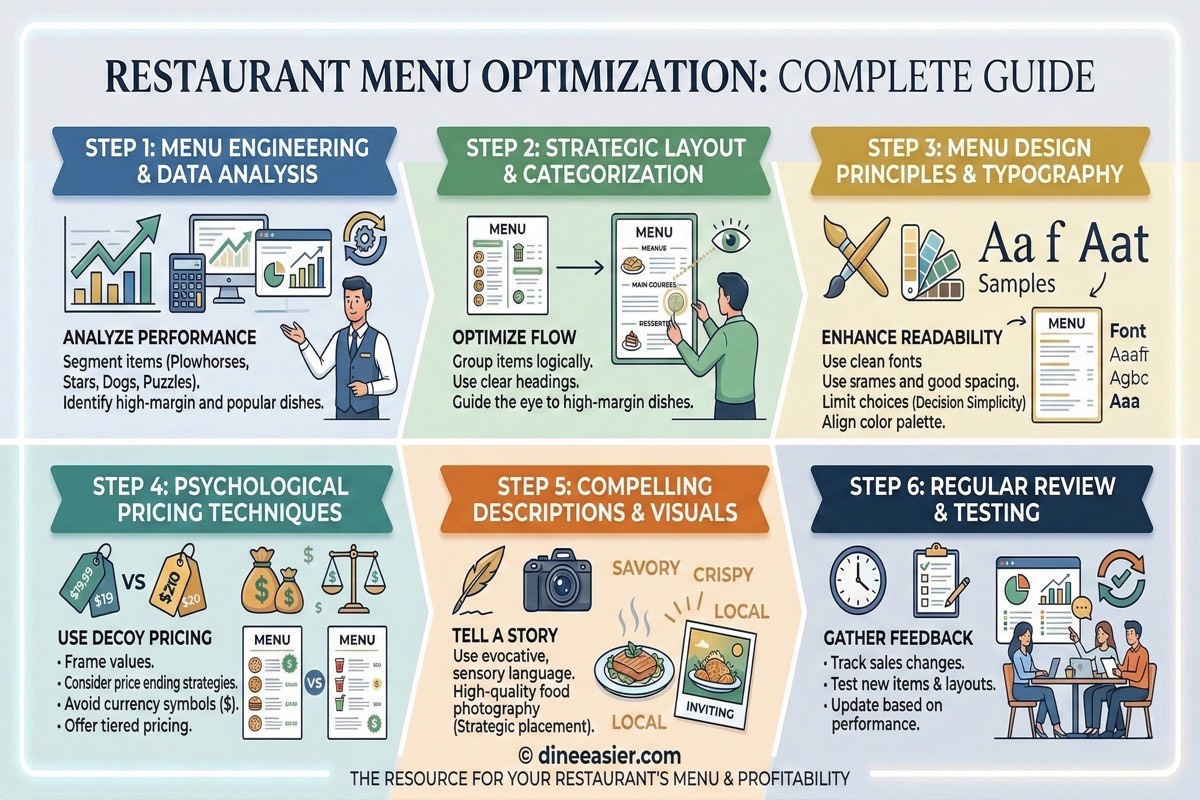
The Menu Optimization Checklist
Here's a practical checklist you can work through this week:
Structure
- 5-7 items per category (split large categories)
- Highest-margin items listed first in each category
- One premium anchor item at the top of key categories
- Clear, logical category names
- Separate sections for combos/deals
Pricing
- Currency symbols removed or minimized
- Prices placed after descriptions, not in a column
- Charm pricing (₹299) on value items, round pricing (₹500) on premium
- 2-3 strategic combos with 15-20% perceived savings
- Price comparison with competitors (are you leaving money on the table?)
Content
- Descriptive names and descriptions for top items
- Photos for at least 5 items per category
- Consistent photo style across the menu
- Dietary tags on every item (veg/non-veg minimum)
- Spice levels indicated
- Major allergens flagged
Digital (if applicable)
- Mobile-first layout
- Fast loading (under 3 seconds)
- Category-based navigation
- Search and filter functionality
- Real-time availability updates
- Analytics tracking enabled
Common Mistakes That Cost Sales
1. The "Everything Menu"
A 12-page menu with 150 items doesn't impress customers — it paralyzes them. It also increases kitchen complexity, food waste, and inconsistency. The most profitable restaurants have focused menus with fewer items, each executed well.
2. Hiding Profitable Items
Your best-margin item is on page 3, category 7, item 12. Nobody scrolls that far. Move it to the top of a prominent category.
3. No Descriptions on Premium Items
A ₹900 item with just a name feels overpriced. The same item with a vivid description feels worth it. The more expensive the item, the more the description matters.
4. Identical Treatment for All Items
Not every item deserves equal space. Feature your stars (high profit + high popularity). Demote your dogs (low profit + low popularity). This is basic menu engineering, and most restaurants don't do it.
5. Never Updating the Menu
A menu should evolve. Seasonal items, pricing adjustments, new additions, retired dishes. A static menu is a stale business. Digital menus make this effortless — there's no excuse not to refresh quarterly at minimum.
Start Today, Not Tomorrow
Menu optimization isn't a one-time project. It's an ongoing process of testing, measuring, and refining. But you don't need to do everything at once.
Week 1: Rewrite descriptions for your top 10 items. Photograph your top 5.
Week 2: Audit your categories. Trim or split any with more than 8 items. Reorder items by margin, not alphabetically.
Week 3: Add dietary tags to every item. Flag allergens.
Week 4: Review your pricing. Add one anchor item. Create 2 combos.
Four weeks. Minimal cost. And you'll see the difference in your average order value before the month is over. If you'd rather start from a clean slate, you can build a free digital menu and apply these tactics as you go.
The restaurants that treat their menu as a living, optimized sales tool consistently outperform those that don't. Your food might be great — but if your menu isn't selling it properly, you're leaving money on the table. Literally.
Related Articles
Why Too Many Items on Your Restaurant Menu Hurt Sales
Research shows oversized menus overwhelm diners, increase waste, and slow your kitchen. Learn the ideal menu size and how to trim yours for higher profits.
Why Dietary Tags on Your Menu Increase Restaurant Orders
Customers skip menu items they are unsure about. Dietary labels like veg, Jain, vegan, and allergen tags remove doubt, unlock group dining, and directly increase orders per table.
Restaurant Menu Pricing Strategy: How to Price Your Menu for Maximum Profit
Learn proven menu pricing strategies including food cost analysis, pricing psychology, anchoring, and dynamic pricing to maximize your restaurant profit margins.